Video Tutorials for "CatNet"
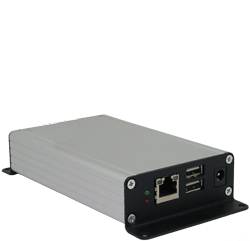
"CatNet" is the working title for a device that is currently in beta testing.
It is a small single board computer in an enclosure about the size of a thick paperback book. It runs the Linux operating system for enhanced security and stability and uses Flash memory for storage. There are no hard drives or other moving parts.
It is completely web-based and multi-user. All setup and user interaction is done via a web browser. No PC is necessary for normal operation other than the users PC running a browser when they wish to access the front-end.
The front-end uses Adobe Flash. This allows a much more sophisticated interface than HTML. Flash is also not browser sensitive. It works equally well with any modern browser, including under Windows, Mac and Linux PCs.
The #1 design goal is ease of setup and use. No knowledge of HTML, Flash, Linux or programming is required. An advanced templating feature means once a single device has been set up, it can be repeatedly cloned, including all points, graphics, schedules. etc. In OEM situations, it can be preloaded with templates for all of the manufacturers devices so the installer doesn't have to do any manual configuration.
LonWorks and ModBus/485 systems are currently supported. BACnet and ModBus/TCP will definitely be available soon, and we are gauging interest in other systems. Feedback on other systems to support is welcome.
Devices and points from all supported systems can be freely mixed on graphics and throughout the front-end. The goal is to hide the differences between systems from the user.
For questions or comments contact
The following are preliminary video tutorials made to help beta testers get up and running.
Be sure to view the "Templates" video as it can save a lot of setup time.
If you prefer, you can download a zip file of all videos. (Load tutorials.html in your browser)
Videos:
Templates Note: I mentioned in this video that you can save the entire site as a template. This is not correct, but you can duplicate the site on another unit by copying a folder via FTP.